

 English
 русский
 Español
Content
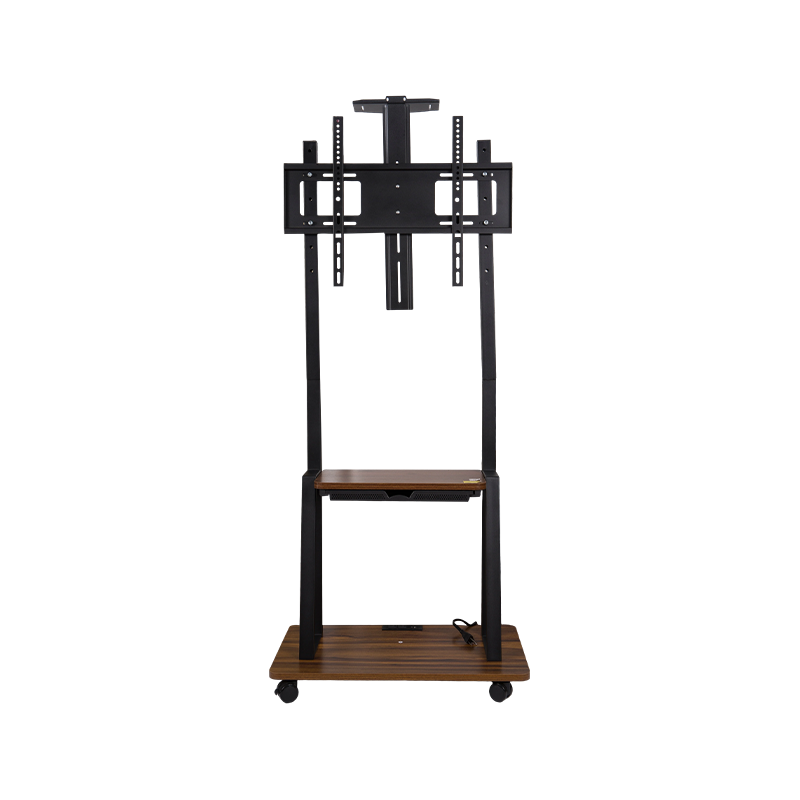
A rolling TV stand is the superior choice for anyone needing maximum flexibility, ergonomics, and mobility for their display screens. Unlike fixed wall mounts or static furniture, a mobile stand allows you to reposition your television or digital signage effortlessly within seconds. This adaptability makes it an essential asset for dynamic environments such as modern offices, educational institutions, healthcare facilities, and increasingly, residential home theaters or hybrid workspaces. By investing in a high-quality rolling TV stand, you eliminate the need for permanent installation, protect your walls from damage, and optimize viewing angles for any audience or lighting condition.
Why Mobility Matters in Modern Spaces
The primary advantage of a rolling TV stand is its inherent mobility, which fundamentally changes how we interact with visual media. In a commercial setting, meeting rooms often serve multiple purposes throughout the day. A mobile cart allows a large display to be moved between conference rooms for presentations, into a lobby for digital signage, or to a training area for workshops. This fluidity ensures that expensive display technology is utilized to its maximum potential rather than sitting idle in a single room.
In residential settings, the rise of open-plan living and hybrid work has created a demand for versatile entertainment solutions. A rolling stand enables a homeowner to move a TV from a living room to a patio for a movie night or into a dedicated home office corner for video conferencing. This ability to reconfigure a space without construction is invaluable, particularly for renters or those who frequently rearrange their furniture.
Ergonomic Benefits and Height Adjustability
Beyond mere movement, rolling TV stands offer significant ergonomic advantages that fixed installations often lack. Many high-quality mobile stands feature a telescopic pole or adjustable mounting brackets, allowing the user to change the height of the screen. This feature is critical for reducing neck and eye strain, ensuring that the screen is always at the optimal eye level regardless of whether the audience is seated in chairs, standing, or gathered around a high table.
Optimizing Viewing Angles
Glare from windows or overhead lighting can severely degrade the viewing experience. Fixed wall mounts are at the mercy of the room's architecture; if the sun hits the screen directly, the viewer is forced to deal with the reflection. A rolling stand allows the user to simply rotate or tilt the TV to a better angle. Furthermore, many mobile stands come with tilt and swivel functions, providing precise control over the screen orientation. This ensures that every seat in the room is a good one, which is particularly important in classrooms or trade show booths where viewing angles vary widely.
Key Features to Look for in a Quality Stand
When selecting a rolling TV stand, it is essential to look beyond the price tag and evaluate the structural features that ensure safety and durability. A robust stand must be constructed from heavy-duty steel to support the weight of modern, large-screen televisions. The stability of the base is paramount; a wide base with a low center of gravity prevents tipping, which is a crucial safety consideration in environments with children or high foot traffic.
Caster Quality and Locking Mechanisms
The wheels, or casters, are the heart of the stand's mobility. Look for casters that are at least 3 to 4 inches in diameter to roll smoothly over carpets, cables, and door thresholds. Full-locking mechanisms are a non-negotiable safety feature. These locks should immobilize both the wheel's rotation (swivel) and its rolling movement. This ensures that once the TV is positioned, it stays firmly in place, even if bumped accidentally during a presentation or while cleaning.
Cable Management Systems
Aesthetics and safety go hand in hand with cable management. A tangle of power cords and HDMI cables not only looks unprofessional but also poses a tripping hazard. The best rolling TV stands include integrated cable management solutions, such as plastic channels or hollow poles, that route wires neatly from the TV down to the base. This keeps the setup looking clean and prevents cables from snagging on furniture while the cart is in motion.
Ideal Applications for Home and Business
The versatility of the rolling TV stand makes it suitable for a vast array of scenarios. Understanding the specific needs of your environment will help you choose the right model, whether it prioritizes shelf space for AV equipment or minimalist design for tight spaces.
- Corporate Offices: Ideal for video conferencing in huddle rooms, displaying dashboards in operations centers, or facilitating presentations in boardrooms.
- Education: Teachers can wheel displays between classrooms or move the screen closer to students for better visibility of interactive lessons.
- Trade Shows: Provides a professional backdrop for booths, allowing companies to showcase promotional videos and product demos with high impact.
- Home Gyms: Allows users to watch entertainment or follow workout routines while exercising, with the ability to move the screen out of the way when not in use.
- Healthcare: Used in patient waiting areas for entertainment or in staff rooms for training and telemedicine consultations.
Comparative Analysis: Mounting Options
To fully appreciate the value of a rolling TV stand, it is helpful to compare it against other common mounting solutions. The following table outlines the differences between mobile stands, fixed wall mounts, and TV cabinets, highlighting the specific trade-offs regarding flexibility, space usage, and installation effort.
| Feature | Rolling TV Stand | Fixed Wall Mount | TV Cabinet |
|---|---|---|---|
| Mobility | High (Can move anywhere) | None (Permanent location) | Low (Difficult to move) |
| Installation | Minimal (Assembly required) | Complex (Studs and drilling) | None (Free-standing) |
| Floor Space | Small footprint | Zero footprint (Off floor) | Large footprint |
| Adjustability | High (Height and tilt) | Medium (Tilt only usually) | None (Fixed height) |
Understanding VESA Patterns and Weight Capacity
One of the most technical yet critical aspects of purchasing a rolling TV stand is compatibility. Nearly all modern televisions and monitors adhere to the VESA (Video Electronics Standards Association) mounting standard. This refers to the square pattern of mounting holes on the back of the display. Common patterns include 200x200mm, 400x400mm, and 600x400mm.
Before purchasing a stand, you must measure the horizontal and vertical distance between the screw holes on your TV. Additionally, you must check the weight of your television. Always choose a stand with a maximum weight capacity that exceeds the weight of your TV. For example, if your television weighs 50 pounds, a stand rated for 100 pounds is recommended. This safety buffer ensures that the stand remains stable and rigid, preventing sagging or catastrophic failure over time.
Installation Steps for Safety
While rolling stands are easier to install than wall mounts, proper assembly is crucial for safety. Follow these general steps to ensure a secure setup:
- Attach the Mounting Plate: Secure the metal bracket to the back of the TV using the appropriate bolts provided in the hardware kit.
- Assemble the Base and Pole: Connect the pole to the base frame, ensuring all bolts are tightened firmly to eliminate wobble.
- Mount the TV: With the help of a second person, lift the TV and hang the mounting plate onto the pole bracket.
- Secure and Level: Tighten the security screws or fasteners to lock the TV in place. Use a built-in bubble level to ensure the stand is perfectly vertical.
- Route Cables: Organize the power and AV cables through the management system to keep them clear of the wheels.